For week five, we were asked to create assets to use in our top-down shooter. The basic sprites we needed to make were the player character, a set of three enemies, a projectile, a crosshair and a weapon. I planned to also draw a background in the same pixel art style as the assets.
Ideas
My initial idea for my game was to create a top-down shooter where you play as a cat armed with a pistol and your main objective is to fight off incoming squirrels. I planned for the overall shape of the player character to be quite rounded, so it would appear much less threatening when compared to the squirrel sprites. For these enemies, I wanted to create three different colour variations of the same squirrel so when I implement them into my game, I can make them function in different ways. In the same way as the player sprite, I planned to give this sprite much sharper edges to make it clear to the player that there are enemies. For the weapon and projectile, I planned to create a simple pixel art pistol and a small white circle, so when I use the projectile sprite in Unity, it won’t matter which way the sprite is rotated. The pistol would sit on the back of the cat and spin in the direction that the cursor is and follow it as it moves. For the crosshair, it would simply act as a replacement for the mouse on the screen, allowing the player to clearly see where the gun is aiming at all times. If the main focus of the game was going to be fighting the enemy squirrels, I wanted to keep the background simple so I planned to draw some pixel art grass.
Creating The Sprites
I created all of my sprites in Photoshop using artboards, where I can have multiple projects open at once on the same screen and work seamlessly between each without changing tabs. This also means when it comes to exporting the images, I can export them as individual pngs without having to repeat the process multiple times. For all of the assets I created, I used the pencil tool as they are all pixel art, meaning I can colour the individual pixels of the image instead of the brush tool.
Final Outcomes

This is my player sprite which turned out exactly how I imagined. In the actual game, the player will be able to control where the sprite moves and if it comes into contact with one of the enemy squirrels, the game will end. I decided to make the cat look visibly angry as my idea behind the game was the cat getting revenge on the squirrels and I think this helps express that. I think that if I was to recreate this sprite I would have made the cat’s legs more clear as due to the way I did the pixel art, it looks slightly odd. Despite this, I think this sprite worked quite well.


These are the three squirrel variants I made for the enemy sprites. They are all basically identical besides the different colours, but these will function as the three tiers of enemy types in my game. I think that the shading I did for this pixel art worked very well and you can clearly tell that the sprite is a squirrel. If I was to make these images again, I would try to add some more detail to each individual sprite instead of simply swapping the colours, making each individual sprite more unique.


These two sprites are for the weapon and crosshair. In the game itself, the pistol will sit on the back of the cat and spin to face wherever the crosshair is positioned on the screen. I feel like the simplicity of these sprites is what makes them effective, as they serve a simple function and don’t need to be overly complicated.
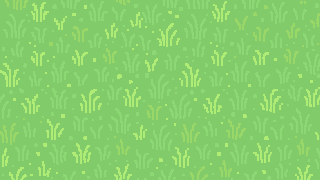
Finally, this is the background I created for the game. I wanted this to be quite simple while staying with the animal theme, so I think this pixel art grass is exactly that. By using this bright shade of green, it adds a good amount of colour to the game overall, seeing as the rest of the sprites are much less colourful. Despite having the game centred around shooting the squirrels, this colour scheme brings a surprisingly light-hearted tone to the game as a whole.